

Most websites do two jobs at once. They show you pages in your browser, and they run code on a server you never see, to read a database or check who you are. So what is TanStack Start? It’s a free, open-source framework for building both halves of a website with React, in one project.
This is Part 1 of the TanStack Start Tutorial, a free, hands-on course for complete beginners. It’s the only theory in the series, and it’s short: what TanStack Start is, how a page loads and which code runs where. From Part 2 on, every part is hands-on: you run the commands, see the real output and build something you can open in your browser.
By the end of the whole series, you’ll be able to:
- create a TanStack Start app and run it on your own computer
- build pages, links and layouts with type-safe routing
- load data, and run server code safely with server functions and server routes
- save data in a PostgreSQL database with Drizzle ORM
- let people sign in, and protect the pages that need it
- choose how each page is rendered: on the server, in the browser or ahead of time
- style the site, make it easy for search engines to read, test it and put it online for free on Netlify
This is Part 1 of the TanStack Start Tutorial. The parts in Module A, Start Here:
- Part 1: What Is TanStack Start? A Full-Stack React Framework Explained (you are here)
- Part 2: Create Your First TanStack Start App
- Part 3: Pages and Links: File-Based Routing
All parts of the TanStack Start Tutorial
Module A: Start Here
- Part 1: What Is TanStack Start? A Full-Stack React Framework Explained
- Part 2: Create Your First TanStack Start App
- Part 3: Pages and Links: File-Based Routing
Module B: Routing
- Part 4: Dynamic Routes and Path Params
- Part 5: Search Params: Type-Safe Filters and Sorting
- Part 6: Layouts, Nested Routes and Navigation in Code
Module C: Data
- Part 7: Load Data with Route Loaders
- Part 8: Server Functions
- Part 9: Forms and Mutations
- Part 10: TanStack Query with TanStack Start
- Part 11: Streaming and Deferred Data
Module D: Server
- Part 12: What Runs Where: the Execution Model
- Part 13: Environment Variables and Secrets
- Part 14: Server Routes: Build a JSON API
- Part 15: Middleware and Context
- Part 16: Errors and Not Found Pages
Module E: Database
- Part 17: Connect PostgreSQL with Drizzle ORM
- Part 18: Create, Edit and Delete Data
Module F: Sign-In
- Part 19: Sessions and Cookies
- Part 20: Protected Routes
- Part 21: Sign-In with Better Auth: Email and GitHub
Module G: Rendering
- Part 22: Server-Side Rendering and Hydration Errors
- Part 23: Selective SSR and SPA Mode
- Part 24: Static Prerendering and ISR
Module H: Look and SEO
- Part 25: Style with Tailwind CSS
- Part 26: SEO: Titles, Meta Tags, Sitemap and Structured Data
Module I: Ship
- Part 27: Test Your App with Vitest
- Part 28: Production Build and Checklist
- Part 29: Deploy to Netlify for Free with a Neon Database
- Part 30: Final Project, Cheat Sheet and What to Learn Next
Cost: free. TanStack Start is open source, and every part of this series runs on your own computer at no cost. Only the deploy part at the end uses online accounts, on free plans.
Note: There’s nothing to install or run in this part. From Part 2 on, every command and output you see is real, run with TanStack Start 1 on Node.js 26.
What Is TanStack Start?
TanStack Start is a full-stack framework for React. Its documentation calls it “a full-stack React framework powered by TanStack Router”. Three words in that sentence are worth knowing:
- React is a free library for building user interfaces out of small, reusable pieces called components, written in JavaScript (react.dev).
- Full-stack means both halves of a website: the front end, which runs in your browser, and the back end, which runs on a server.
- Framework means it gives you the structure and the tools for a whole app, so you don’t have to connect every piece yourself.

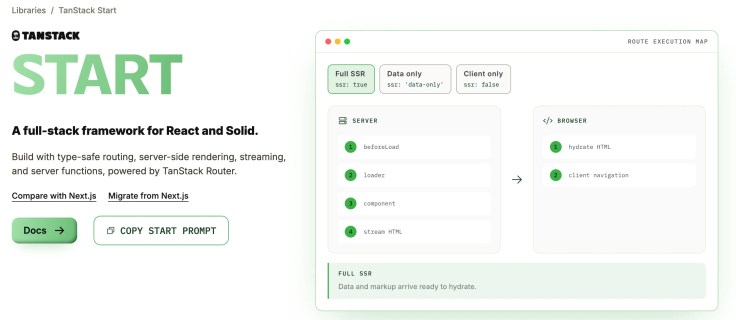
Four facts are worth knowing before you start:
- It’s free and open source. TanStack Start uses the MIT License, and TanStack’s documentation says its libraries are 100% open source and free to use.
- It’s stable. TanStack announced version 1.0 as stable on 13 October 2026, after a release-candidate period.
- It’s built on TanStack Router and Vite. TanStack Router decides which page to show for each web address. Vite runs your app while you work on it and builds it for production. TanStack Start also supports Rsbuild, a similar build tool; this series uses Vite.
- It works with React and Solid. Solid is another library for building user interfaces. This series uses React.

What TanStack Start Gives You
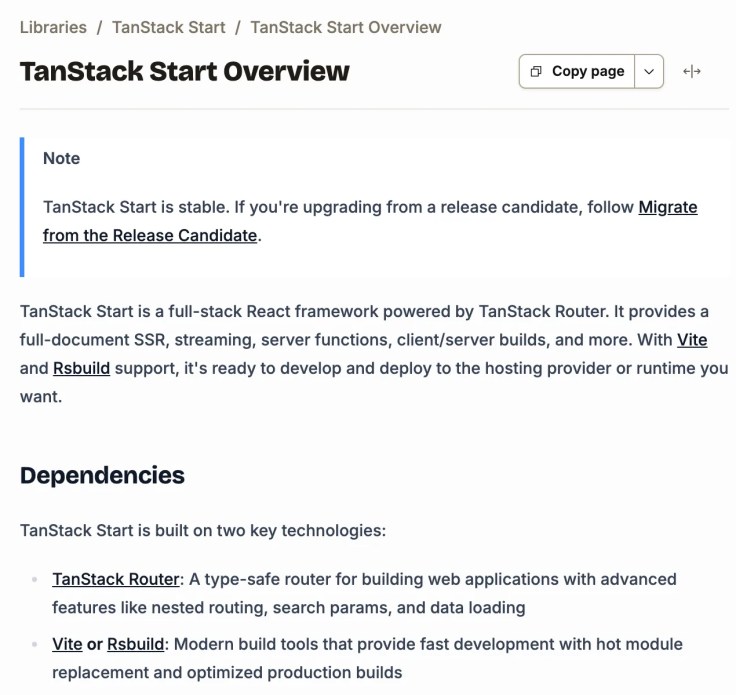
TanStack Start’s overview lists what it adds on top of the router. In plain words:
- Full-document server-side rendering (SSR): the server builds each page’s complete HTML, which helps both speed and search engines.
- Streaming: the page arrives in pieces, so people see content sooner.
- Server functions: functions that run only on the server, but that your page can call like normal code.
- Server routes: your own API addresses that other apps can call, such as
/api/books. - Middleware and context: code that runs before your pages and functions, for jobs such as logging or checking who’s signed in.
- Full-stack builds: one build that makes both the browser code and the server code.
- Universal deployment: you can put the app online with many hosting providers.
- End-to-end type safety: full TypeScript support, from the server to the browser.
TypeScript is JavaScript with types: it checks your code as you write it and catches many mistakes before you run anything (typescriptlang.org). This series uses TypeScript throughout, and explains each piece of it when it first appears.
How a TanStack Start Page Loads
The first time you open a page, the server builds it. After that, your browser does most of the work, and asks the server only for what has to stay there.

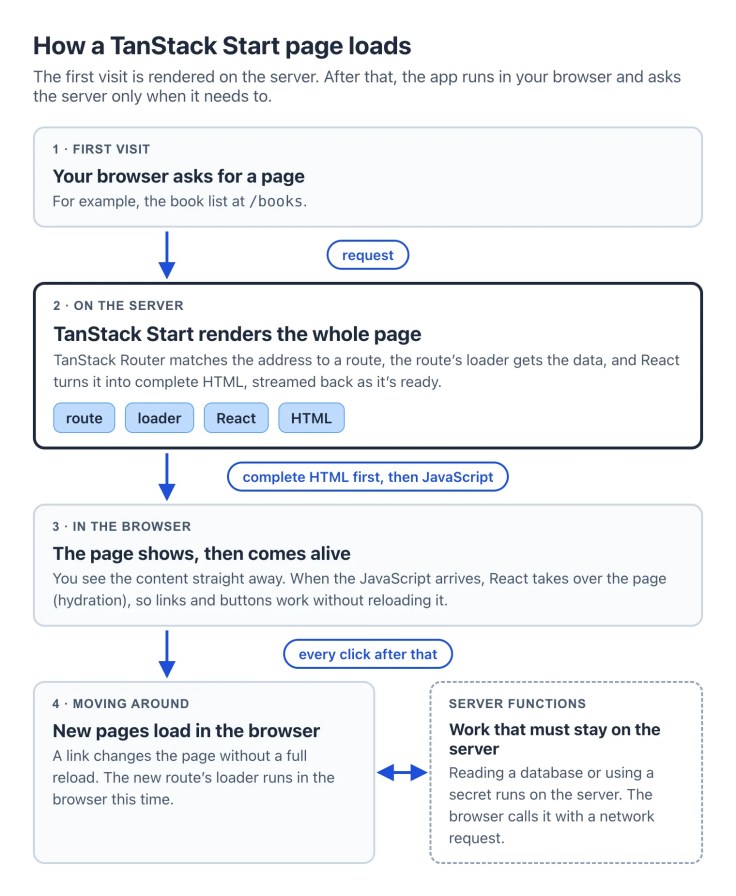
Two words from the diagram come up in almost every part:
- A loader is a function attached to a page. It gets the data the page needs before the page shows.
- Hydration is React taking over the HTML the server sent. Before it, you can already read the page; after it, the buttons and links that run code work too.
Tip: Because the server sends finished HTML first, people see real content before any JavaScript runs, and search engines can read the page. That’s what TanStack Start’s overview means by server-side rendering “for better performance and SEO”.
What Runs on the Server and What Runs in the Browser
In TanStack Start, code runs in both places unless you say otherwise. The documentation calls this “isomorphic by default”: the same code goes into the server and into the browser.


This matters most for secrets. A loader runs on the server for the first visit and in the browser when you move between pages, so anything you put in it can end up in the browser. Passwords, keys and database code belong in server functions, which always run on the server. Part 8 builds your first one, and Part 12 covers the rest of these rules.
TanStack Start, TanStack Router and React: How They Fit
You’ll meet four names all through this series. Each one has one job:
- React draws the page from components.
- TanStack Router picks the page for each web address, and uses TypeScript to check your links and the values in your addresses.
- TanStack Start adds the server: server-side rendering, server functions, server routes, middleware and the builds.
- Vite runs your app while you work on it, and builds it for production.
TanStack’s overview says Start relies completely on TanStack Router for its routing. If you’re sure an app will never need a server, TanStack Router on its own is enough. This series uses TanStack Start, because the bookshop needs a server and a database.
What You’ll Build in This Series
You’ll learn every feature on one small, made-up project: a website for a bookshop. It starts as a single page and grows part by part:
- a home page that you create and open in your browser (Part 2)
- pages and links, then a page for every book, with search and sorting (Modules A and B)
- books loaded from the server, a form, and a slow panel that streams in (Module C)
- an API, middleware, and error and not-found pages (Module D)
- the books in a PostgreSQL database, with admin pages to add, change and remove them (Module E)
- sign-in with an email and password, or with a GitHub account (Module F)
- the right rendering for each page, styling and SEO (Modules G and H)
- tests, a production build, and the site online on Netlify (Module I)
The bookshop sells the same made-up books as the PostgreSQL Tutorial and the OpenTofu Tutorial on this site, such as The Paper Lantern Café and Salt and Starlight.
Free From Start to Finish
- Parts 1 to 28: only your own computer. From Part 17 that includes PostgreSQL, which is free too.
- Parts 21 and 29: a free GitHub account, so people can sign in with GitHub and so the site can be published from your code.
- Part 29: free accounts with Netlify, to put the site online, and Neon, for an online database. The part shows what each free plan includes before you sign up.
What You Need
- a Mac, a Windows 11 PC or a Linux computer where you’re allowed to install software
- Node.js, from Part 2 on. Node.js runs JavaScript outside a browser, and TanStack Start’s tools run on it. TanStack Start needs Node.js 22.12 or later; this series uses Node.js 26, the current long-term support (LTS) version, from nodejs.org.
- a code editor. Visual Studio Code is a good free choice.
- PostgreSQL, from Part 17 on. The PostgreSQL Tutorial shows you how to install it.
- no React or TypeScript experience. Knowing a little HTML helps.
Common Mistakes
| Mistake | What happens | Do this instead |
|---|---|---|
| Putting a password or key in a loader | Loaders also run in the browser, so the secret can end up in code anyone can read | Keep secrets in server functions, which run only on the server |
| Mixing up TanStack Start and TanStack Router | You look for a server feature in the router’s documentation and don’t find it | Use the router’s docs for pages and addresses, and Start’s docs for anything on the server |
| Expecting React Server Components, as in Next.js | Code written for Next.js’s server components doesn’t fit a TanStack Start app | Use loaders and server functions. Server Components are an experimental, opt-in feature in TanStack Start, and this series doesn’t need them. |
| Following a guide written for the release candidate | Some names and setup steps differ from version 1.0 | Use guides for TanStack Start 1 and the official documentation |
FAQ
Is TanStack Start free?
Yes. TanStack Start is open source under the MIT License, so you can use it for personal and commercial projects without paying.
Is TanStack Start ready for production?
Yes. TanStack declared version 1.0 stable on 13 October 2026, which the team describes as a formal commitment to its APIs. The overview also says it’s stable.
Do I need to know React first?
No. Each React and TypeScript idea is explained in a sentence or two where it first comes up. If you want to go deeper, the official React documentation at react.dev is the place to start.
How is TanStack Start different from Next.js?
Both build full-stack React apps. According to TanStack’s comparison, Next.js is built around React Server Components and comes with tools for images, fonts and page metadata. TanStack Start is built around TanStack Router’s typed addresses, loaders and server functions, and its Server Components support is experimental.
Can I use TanStack Start without a server?
Yes. It has an SPA mode, where the browser does all the rendering, and static prerendering, which builds pages ahead of time. Parts 23 and 24 cover both.
Where can I host a TanStack Start app?
With many providers. TanStack’s hosting guide names Cloudflare, Netlify and Railway as its official hosting partners, and has guides for others. This series puts the bookshop online with Netlify’s free plan in Part 29.
Conclusion
TanStack Start is a free, open-source framework for building full-stack React apps. TanStack Router picks the page for each address, the server renders it first, and React takes over in the browser. Code runs in both places by default, so anything secret goes in server functions.
Next, install Node.js. Then Part 2 has you create your first TanStack Start app and open it in your browser.
Coming next: Part 2: Create Your First TanStack Start App.
Additional Resources
- TanStack Start Overview, in the official documentation
- Getting Started with TanStack Start
- Execution Model: what runs on the server and in the browser
- TanStack Start vs Next.js, TanStack’s own comparison
- TanStack Start 1.0 is Stable, the announcement
- TanStack Router Overview
- React documentation
- Download Node.js
- The MIT License in the TanStack/router repository on GitHub
TanStack, React and other names mentioned are trademarks of their respective owners. JD Bots isn’t affiliated with or endorsed by TanStack.
