

TanStack Start and Next.js both build full-stack React apps: pages rendered on a server, plus server code, in one project. So what’s the difference between TanStack Start and Next.js? They’re built around different ideas, and that changes how you write your app.
This post compares them point by point, using each framework’s official documentation: TanStack Start 1 and the Next.js 16 App Router. It doesn’t crown a winner for every app. It shows what each one is built for, so you can choose.
The Short Answer
Both frameworks can build interactive apps and server-rendered websites. TanStack’s own comparison sums up the choice like this:
- Choose TanStack Start when you want type-safe web addresses and search parameters, a loader you can see in each route, and server functions you call like normal code.
- Choose Next.js when you want React Server Components as the default way to build pages, and built-in tools for images, fonts and page metadata.
TanStack Start vs Next.js at a Glance
| TanStack Start | Next.js (App Router) | |
|---|---|---|
| Built around | TanStack Router | React Server Components |
| Pages by default | Rendered on the server, then hydrated in the browser | Server Components; interactive parts are marked with "use client" |
| React Server Components | Experimental and opt-in | The core component model |
| Calling server code | Server functions, with GET or POST and an input validator | Server Actions |
| API endpoints | Server routes | Route Handlers |
| Code that runs before requests | Request middleware and server function middleware | Proxy, called Middleware before Next.js 16 |
| Caching | The router’s loader cache, plus TanStack Query if you want it | Cache Components, with use cache |
| Build tool | Vite or Rsbuild | Turbopack |
| Images and fonts | Your choice of CSS, an image service or an integration | Built in: next/image and next/font |
| License | MIT | MIT |
Rendering: How Pages Are Built
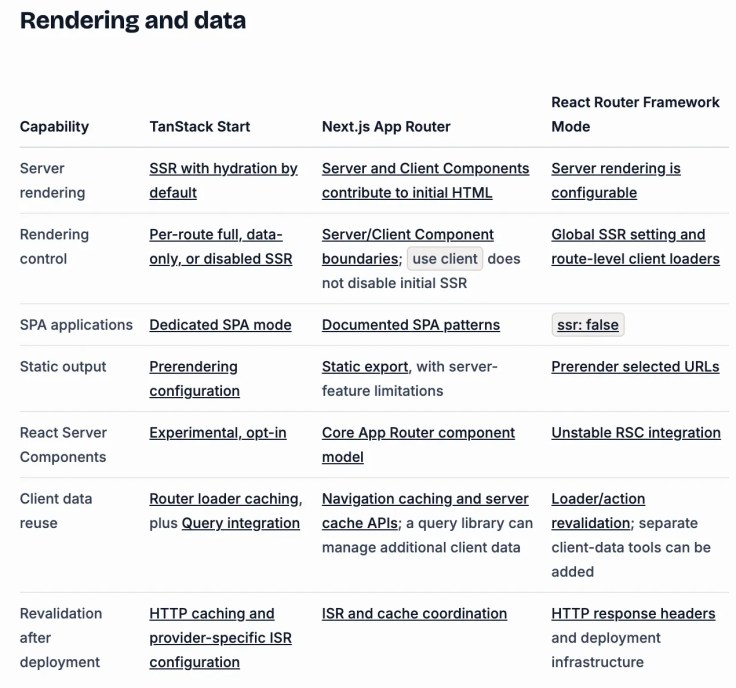
In TanStack Start, pages are rendered on the server and then hydrated by default. Hydration means React takes over the server’s HTML in the browser, so the page becomes interactive. You can change this for each route with selective SSR: full server rendering, data only, or rendering only in the browser.
In Next.js, layouts and pages are Server Components by default. They run on the server, and you add the "use client" directive to the files that need state, events or browser features. Everything such a file imports goes into the browser code too.
React Server Components are the biggest difference. They’re the heart of Next.js. TanStack Start offers them only as an experimental, opt-in feature, and doesn’t need them for its server rendering or its server functions.

Routing and Type Safety
TanStack Start uses TanStack Router, which connects the types of your links, path parameters, validated search parameters, loaders and route context. If you mistype a link or leave out a value an address needs, TypeScript tells you before you run the app. That helps most when a lot of your app’s state lives in the address, such as filters and sorting.
Next.js can also check links at compile time, with its typedRoutes option, which you switch on yourself. According to TanStack’s comparison, the difference is how far the checking reaches across your app, not whether Next.js supports TypeScript.
In both frameworks, a valid address doesn’t prove that a record exists or that a user may see it. You still check that at runtime.
Server Code: Server Functions vs Server Actions
In TanStack Start, a server function is code that runs only on the server, but that your page calls like a normal function. You choose GET or POST, add an input validator, and the inputs and outputs are typed on both sides. You can also add middleware to it, for example to check who’s signed in.
In Next.js, Server Actions are built into forms and into React’s pending and error states, as the Next.js forms guide shows. They can validate input with a schema too.


Both need the same care. A TypeScript type doesn’t check anything while the app runs, so validate untrusted input on the server, and check that the user is allowed to do what they ask. For plain API addresses that other apps call, TanStack Start has server routes and Next.js has Route Handlers.
Caching
TanStack Start caches page data with TanStack Router’s loader cache, which you tune with options such as staleTime and gcTime. When you need a separate cache for your data, you can add TanStack Query through its official integration.
Next.js uses Cache Components: you mark data or whole components with the use cache directive and give them a lifetime with cacheLife. New apps made with create-next-app have it switched on.
A cache in the browser, a cached result on the server and a cached page on a CDN are three different things, so compare the layer your app actually needs.
Build Tools and Speed
TanStack Start builds with Vite or Rsbuild, and Next.js uses its own build tool, Turbopack. TanStack’s comparison doesn’t name a speed winner. It says that a fair test builds the same app in both, on the same hardware and host, before drawing any conclusion.
Hosting
TanStack Start has deployment guides for many hosts, and Cloudflare, Netlify and Railway are its official hosting partners. Next.js can run on your own server too: its self-hosting guide covers caching, streaming and running several copies of an app, so those features aren’t limited to Vercel. Either way, check that your host supports the features you use.
Should You Move a Next.js App to TanStack Start?
Not just for a different routing model. TanStack’s own advice is that a healthy Next.js app isn’t a reason for a rewrite. If you’re considering a move, build one representative route in TanStack Start first: load real data, validate search parameters, save a change, handle a user without access and deploy it. If that’s easier to maintain, you have real evidence. TanStack has an official migration guide from Next.js for the move itself.
Common Mistakes
| Mistake | What happens | Do this instead |
|---|---|---|
| Comparing a router’s download size with a whole framework | The numbers don’t describe a real app | Build the same app in both and measure it |
| Treating TypeScript types as validation | Bad input still reaches your server code | Validate input on the server, in either framework |
| Assuming Next.js features only work on Vercel | You rule out hosting it yourself | Read the Next.js self-hosting guide |
| Expecting React Server Components in TanStack Start by default | Code written for Next.js doesn’t fit | Use loaders and server functions; Server Components are experimental there |
FAQ
Is TanStack Start faster than Next.js?
There’s no official answer. TanStack’s comparison says it doesn’t establish a winner for startup, reloads, builds, memory or speed, and that you need to measure the same app in both.
Are TanStack Start and Next.js free?
Yes. Both are open source under the MIT License. Hosting your app can still cost money, depending on the host and plan you pick.
Does TanStack Start support React Server Components?
Yes, as an experimental, opt-in feature. TanStack’s documentation says experimental support shouldn’t be presented as the same as Next.js’s production model.
Can I deploy Next.js without Vercel?
Yes. Next.js documents self-hosting, including image optimization, caching and streaming, though you set up that infrastructure yourself.
Which one should a beginner learn?
Either one teaches you React. If you’d like to start with TanStack Start, this site’s free TanStack Start Tutorial starts from zero and explains every step.
Conclusion
TanStack Start and Next.js can build the same kinds of apps, but they start from different places. TanStack Start is built around TanStack Router’s typed addresses, explicit loaders and server functions, with Server Components as an experiment. Next.js is built around React Server Components, with built-in image, font and metadata tools. Pick the model that matches how you like to build, and test one real route before you commit.
Additional Resources
- TanStack Start vs Next.js, in the TanStack Start documentation
- Comparison: TanStack Start vs Next.js vs React Router
- Migrate from Next.js
- Server and Client Components, in the Next.js documentation
- Proxy, in the Next.js documentation
- Caching, in the Next.js documentation
Related
- TanStack Start Tutorial — Part 1: What Is TanStack Start?
- Is TanStack Start Free for Commercial Use? The MIT License Explained
- What Is TanStack Router? Type-Safe Routing for React Explained
TanStack, Next.js, React and other names mentioned are trademarks of their respective owners. JD Bots isn’t affiliated with or endorsed by TanStack or Vercel.
