

A new TanStack Start app has sixteen files, and you work in only a few of them. This guide goes through every file and folder the TanStack CLI creates, says what each one does, and shows where your own code goes.
The project here is the one from TanStack Start Tutorial — Part 2, created with the TanStack CLI and its Biome and Netlify options. A project created with other options has the same core files.
Prerequisites
- A TanStack Start app created with the TanStack CLI, for example by following Part 2.
- A code editor, so you can open the files as you read.
The Whole Project at a Glance
This is everything the CLI writes, apart from node_modules, the folder where npm keeps the installed packages:
bookshop/
├── .cta.json
├── .gitignore
├── .vscode/
│   └── settings.json
├── README.md
├── biome.json
├── netlify.toml
├── package-lock.json
├── package.json
├── src/
│   ├── routeTree.gen.ts
│   ├── router.tsx
│   ├── routes/
│   │   ├── __root.tsx
│   │   └── index.tsx
│   └── styles.css
├── tsconfig.json
├── tsr.config.json
└── vite.config.ts

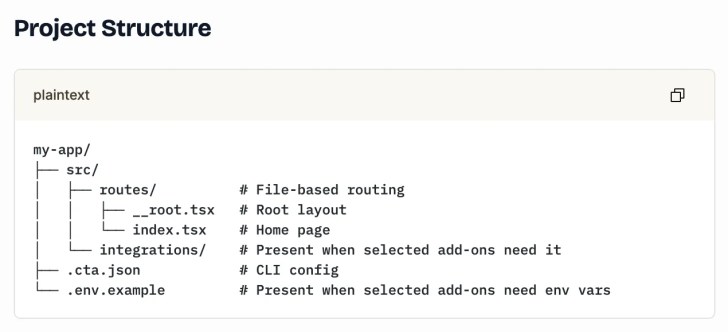
The Files You Edit
| File or folder | What it’s for |
|---|---|
src/routes/ | Your pages. Each file is a route, and its file name sets the address: index.tsx is the home page at /. |
src/routes/__root.tsx | The root route. It wraps every page with the HTML document, its <head> and the global styles, and it always runs. |
src/styles.css | Styles for every page. It loads Tailwind CSS. |
src/router.tsx | Creates the router and its settings, such as scroll restoration and when to preload pages. |
The File TanStack Start Writes for You
src/routeTree.gen.ts is the list of your routes. TanStack Start writes it again whenever you run the app, so changes you make to it are lost. The project’s .vscode/settings.json marks it as read-only for that reason.
Settings Files
| File | What it’s for |
|---|---|
package.json | The app’s packages and its scripts: dev, build, preview, format, lint and check. |
package-lock.json | The exact version of every installed package, so every install gets the same ones. npm writes it. |
vite.config.ts | Settings for Vite, the tool that runs and builds the app, and its plugins: TanStack Start, React, Tailwind CSS, Netlify and the devtools. |
tsconfig.json | Settings for TypeScript, including the #/ path alias for the src folder. |
tsr.config.json | Settings for TanStack Router’s file-based routing. The CLI sets only "target": "react". |
biome.json | Settings for Biome, which formats and checks your code. |
netlify.toml | Settings Netlify uses to build and serve the site. |
.cta.json | The answers you gave the TanStack CLI, such as the add-ons you chose. |
.vscode/settings.json | Editor settings for Visual Studio Code: Biome as the formatter, and routeTree.gen.ts as read-only. |
.gitignore | Files git leaves out, such as node_modules, dist and .env. |
README.md | Notes from the template on running, styling and adding routes. |
Folders That Appear Later
| Folder | When it appears |
|---|---|
node_modules/ | After npm installs the packages. |
dist/ | After npm run build. It holds the built app. |
.netlify/ | After the first dev run or build. The Netlify plugin adds it to .gitignore. |
.tanstack/ | After the first run or build. It’s listed in .gitignore. |
You never edit these, and git leaves all four out.
Where Your Own Code Goes
New pages go in src/routes: a file named about.tsx becomes the page at /about. Changes that every page needs, such as the site title, go in src/routes/__root.tsx.
Common Mistakes
| Mistake | What happens | Do this instead |
|---|---|---|
Editing src/routeTree.gen.ts | TanStack Start writes over your changes | Change the files in src/routes |
Committing node_modules or dist | The repository fills with files npm and Vite can rebuild | Leave them to .gitignore |
FAQ
Why do some file names start with two underscores? __root.tsx must have exactly that name: TanStack Start looks for it to find the root route.
Where is index.html? There isn’t one. The root route builds the HTML document, from <html> to <body>.
Conclusion
In a new TanStack Start app, your pages live in src/routes, the page around them is __root.tsx, and routeTree.gen.ts is written for you. The rest are settings files for Vite, TypeScript, Biome and Netlify.
Additional Resources
- Routing in the TanStack Start docs: the root route,
router.tsxand the route tree - TanStack CLI quick start, including its project structure
- Router CLI, which explains
tsr.config.json
Related
- TanStack Start Tutorial — Part 2: Create Your First TanStack Start App
- TanStack Start Tutorial for Beginners, every part of the series
TanStack, React and other names mentioned are trademarks of their respective owners. JD Bots isn’t affiliated with or endorsed by TanStack.