 Skip to main content


Some tools look for Docker at /var/run/docker.sock, its standard address on macOS and Linux. Docker Desktop for Mac keeps its own socket in your home folder, at ~/.docker/run/docker.sock, and creates /var/run/docker.sock only when one setting is on.
This guide turns that setting on, in one place in Docker Desktop’s settings. It’s how the OpenTofu Tutorial’s Docker parts reach Docker on a Mac.
Prerequisites
- Docker Desktop for Mac, installed and running (Install Docker Desktop on Mac (opens in a new tab)).
- Your Mac password: Docker Desktop asks for it, because the setting adds a file to a system folder.
Step 1: Open the Advanced Settings
In Docker Desktop, click the gear icon (Settings) at the top right. Then click Advanced in the list of settings sections.
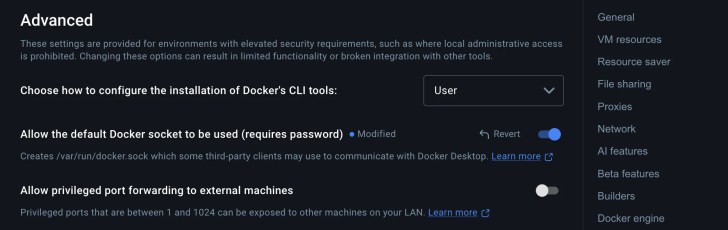
Step 2: Turn On the Default Docker Socket
Switch on Allow the default Docker socket to be used (requires password). Docker Desktop marks it Modified until you apply it:
Step 3: Apply the Change
Click Apply at the bottom of the window, then type your Mac password when macOS asks:

Docker Desktop creates /var/run/docker.sock as a link to its own socket. Tools that use Docker’s standard address can now reach Docker Desktop, without any setting of their own.
Turn It Off Again
Switch the same setting off and click Apply. Docker Desktop’s own tools keep working, because they use the socket in your home folder.
FAQ
Why does Docker Desktop ask for my password?
/var/run is a system folder that belongs to the administrator account, so adding anything to it needs an administrator’s password.
Do I need this on Windows or Linux?
No. This setting is for Docker Desktop on a Mac. On Linux, Docker Engine creates /var/run/docker.sock itself, and Windows uses a named pipe instead.
Conclusion
One setting in Docker Desktop gives your Mac the standard Docker socket, so tools such as OpenTofu®’s Docker provider find Docker without extra configuration.
Related
Additional Resources
- Change your Docker Desktop settings (opens in a new tab) (Advanced)
- Understand permission requirements for Docker Desktop on Mac (opens in a new tab)
- Install Docker Desktop on Mac (opens in a new tab)
Docker and Docker Desktop are trademarks of Docker, Inc. Other names mentioned are trademarks of their respective owners. JD Bots isn’t affiliated with or endorsed by Docker, Inc.


0 comments