 Skip to main content


If npm run check in a brand-new TanStack Start app ends with “Some errors were emitted while running checks”, Biome is pointing at two things: a settings file written for an older Biome, and starter files written in a different style from Biome’s settings. Two commands fix both.
What I Was Doing
I created a TanStack Start app with the TanStack CLI and its Biome option, then updated Biome from the template’s 2.4.5 to the newest release, 2.6.8, as in TanStack Start Tutorial — Part 2. Then I ran Biome’s check, which the template adds as an npm script:
npm run check
What I Expected
No problems in a project the CLI had just written.
What I Got
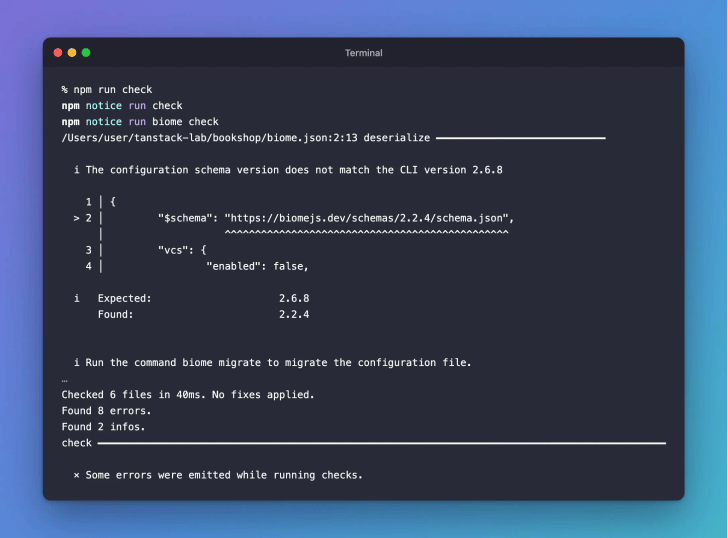
Biome listed several problems and ended with this:
Checked 6 files in 40ms. No fixes applied.
Found 8 errors.
Found 2 infos.
check ━━━━━━━━━━━━━━━━━━━━━━━━━━━━━━━━━━━━━━━━━━━━━━━━━━━━━━━━━━━━━━━━━━━━━━━━━━━━━━━━━━━━━━━━━━━━━━

  × Some errors were emitted while running checks.
What I Checked
The output names each problem. The first one is about the settings file, biome.json: its schema is from Biome 2.2.4, and Biome says what to do:
/Users/user/tanstack-lab/bookshop/biome.json:2:13 deserialize ━━━━━━━━━━━━━━━━━━━━━━━━━━━━

  i The configuration schema version does not match the CLI version 2.6.8

    1 │ {
  > 2 │         "$schema": "https://biomejs.dev/schemas/2.2.4/schema.json",
      │                    ^^^^^^^^^^^^^^^^^^^^^^^^^^^^^^^^^^^^^^^^^^^^^^^
    3 │         "vcs": {
    4 │                 "enabled": false,

  i   Expected:                     2.6.8
      Found:                        2.2.4


  i Run the command biome migrate to migrate the configuration file.
Most of the errors are about formatting. For each starter file, Biome shows how it would write it. In src/routes/index.tsx, the template uses single quotes, no semicolons and two-space indents. Biome adds the semicolons and switches to double quotes and tabs. In its output, · is a space and → is a tab:
src/routes/index.tsx format ━━━━━━━━━━━━━━━━━━━━━━━━━━━━━━━━━━━━━━━━━━━━━━━━━━━━━━━━━━━━━━━━━━━━━━━━

  × Formatter would have printed the following content:

     1    │ - import·{·createFileRoute·}·from·'@tanstack/react-router'
        1 │ + import·{·createFileRoute·}·from·"@tanstack/react-router";
     2  2 │
     3    │ - export·const·Route·=·createFileRoute('/')({·component:·Home·})
        3 │ + export·const·Route·=·createFileRoute("/")({·component:·Home·});
     4  4 │
     5  5 │   function Home() {
     6    │ - ··return·(
     7    │ - ····<div·className="p-8">
     8    │ - ······<h1·className="text-4xl·font-bold">Welcome·to·TanStack·Start</h1>
     9    │ - ······<p·className="mt-4·text-lg">
    10    │ - ········Edit·<code>src/routes/index.tsx</code>·to·get·started.
    11    │ - ······</p>
    12    │ - ····</div>
    13    │ - ··)
        6 │ + → return·(
        7 │ + → → <div·className="p-8">
        8 │ + → → → <h1·className="text-4xl·font-bold">Welcome·to·TanStack·Start</h1>
        9 │ + → → → <p·className="mt-4·text-lg">
       10 │ + → → → → Edit·<code>src/routes/index.tsx</code>·to·get·started.
       11 │ + → → → </p>
       12 │ + → → </div>
       13 │ + → );
    14 14 │   }
    15 15 │
That style comes from the biome.json the CLI writes:
	"formatter": {
		"enabled": true,
		"indentStyle": "tab"
	},

	"javascript": {
		"formatter": {
			"quoteStyle": "double"
		}
	}
Two files also had imports out of order (“Sort these imports”), which Biome sorts for you.
Why It Happens
The CLI writes its starter files in one style, while the biome.json it writes asks for another. That biome.json also names the schema of an older Biome, so a newer Biome reports it as well.
The Fix
First, update the settings file to the installed Biome:
npx biome migrate --write
npm notice run npx
npm notice run 'biome' migrate --write
configuration ━━━━━━━━━━━━━━━━━━━━━━━━━━━━━━━━━━━━━━━━━━━━━━━━━━━━━━━━━━━━━━━━━━━━━━━━━━━━

  i Migration results:

  - /Users/user/tanstack-lab/bookshop/biome.json: configuration successfully migrated.
Then format the files and sort their imports. -- --write tells Biome to fix what it finds instead of only listing it:
npm run check -- --write
npm notice run check
npm notice run biome check --write
Checked 6 files in 10ms. Fixed 5 files.
After the Fix
The check passes:
npm run check

Common Mistakes
| Mistake | What happens | Do this instead |
|---|---|---|
Running only npm run check -- --write | The schema message about biome.json stays | Run npx biome migrate --write first |
| Fixing each file by hand | Slow, and easy to miss a semicolon or a tab | Let --write do it |
Troubleshooting
| Problem | Fix |
|---|---|
npx biome runs a different version | Run the commands from the project folder, so npx uses the project’s Biome. |
FAQ
Does formatting change what my code does? No. The formatter changes only layout: quotes, semicolons and indentation. Sorting imports changes only their order.
Do I need to run this again later? Only npm run check, to see whether new code matches the style. Run npx biome migrate --write again after you update Biome.
Conclusion
A new TanStack Start app fails Biome’s check because its settings file is older than the Biome you install, and its starter files don’t match its own style. npx biome migrate --write and npm run check -- --write fix both, and the check then passes.
Additional Resources
- Biome CLI reference (opens in a new tab), for
biome migrateandbiome check
Related
- TanStack Start Tutorial — Part 2: Create Your First TanStack Start App, which runs both commands in Step 3
- TanStack Start Tutorial for Beginners, every part of the series
TanStack, React and other names mentioned are trademarks of their respective owners. JD Bots isn’t affiliated with or endorsed by TanStack.


0 comments