 Skip to main content


Every TanStack Start app has a file named __root.tsx in src/routes. It’s the root route: the one route that’s always there, wrapped around every page of your app. This post explains what it does, part by part, using the root route of a real app, the Bookshop.
By the end, you’ll know where to put the parts every page shares: the HTML document, the head tags, a header and the 404 page.
Syntax
export const Route = createRootRoute({
	head: () => ({ meta: [<meta tags>], links: [<links>] }),
	notFoundComponent: <NotFound component>,
	shellComponent: <Shell component>,
});
createRootRoutecreates the root route. It takes the same options as any other route, except the ones about an address, because the root route has none.headreturns the tags for the page’s<head>:metatags such as the title, andlinkssuch as a stylesheet.notFoundComponentis the page shown when no page matches the address.shellComponentis the HTML document around every page. It always renders on the server, and it wraps the page, the error page and the not-found page.
The full list of options is in the createRootRoute reference (opens in a new tab) and RouteOptions (opens in a new tab). shellComponent is described in TanStack Start’s Selective SSR guide (opens in a new tab).
What the Root Route Does
- It has no address, and it always matches, whatever page is open.
- It always renders, so it’s the place for the parts every page shares.
- It must be named
__root.tsxand sit at the top ofsrc/routes.
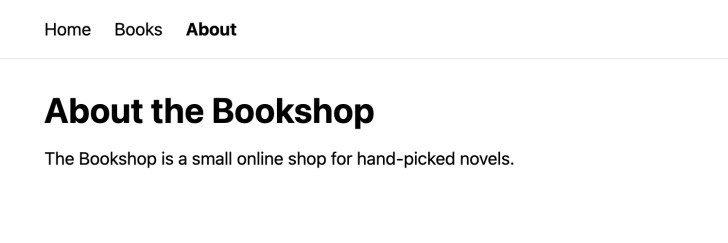
In the Bookshop, the header with the links comes from __root.tsx, and the rest of each page from its own file:
The Shell: html, head and body
The Bookshop’s shell component is RootDocument. It returns the whole HTML document:
function RootDocument({ children }: { children: React.ReactNode }) {
	return (
		<html lang="en">
			<head>
				<HeadContent />
			</head>
			<body>
				<header className="border-b border-gray-200">
					<nav className="mx-auto flex max-w-2xl gap-6 px-8 py-4 text-lg">
						<Link to="/" activeProps={{ className: "font-bold" }}>
							Home
						</Link>
						<Link to="/books" activeProps={{ className: "font-bold" }}>
							Books
						</Link>
						<Link to="/about" activeProps={{ className: "font-bold" }}>
							About
						</Link>
					</nav>
				</header>
				{children}
				<TanStackDevtools
					config={{
						position: "bottom-right",
					}}
					plugins={[
						{
							name: "Tanstack Router",
							render: <TanStackRouterDevtoolsPanel />,
						},
					]}
				/>
				<Scripts />
			</body>
		</html>
	);
}
childrenis the page that’s open. The shell puts it inside<body>, below the header.<HeadContent />writes the tags fromhead. It belongs in<head>.<Scripts />loads the app’s JavaScript in the browser. It belongs at the end of<body>, and TanStack Start’s docs say to always include it.TanStackDevtoolsadds the devtools button you see while you develop. Production builds leave it out.
The Head Tags
	head: () => ({
		meta: [
			{
				charSet: "utf-8",
			},
			{
				name: "viewport",
				content: "width=device-width, initial-scale=1",
			},
			{
				title: "TanStack Start Starter",
			},
		],
		links: [
			{
				rel: "stylesheet",
				href: appCss,
			},
		],
	}),
These tags apply to every page: the character set, the viewport setting that makes the page fit a phone, the page title and the stylesheet. Each page can also add its own head tags; Part 26 of the series covers that.
The 404 Page
	notFoundComponent: NotFound,
	shellComponent: RootDocument,
});

function NotFound() {
	return (
		<main className="mx-auto max-w-2xl p-8">
			<h1 className="text-4xl font-bold">Page not found</h1>
			<p className="mt-4 text-lg">There is no page at this address.</p>
			<Link to="/" className="mt-4 inline-block text-lg underline">
				Go to the home page
			</Link>
		</main>
	);
}
notFoundComponent shows NotFound when no page matches the address. The shell still wraps it, so the header stays on the 404 page too.
The Complete File
import { TanStackDevtools } from "@tanstack/react-devtools";
import {
	createRootRoute,
	HeadContent,
	Link,
	Scripts,
} from "@tanstack/react-router";
import { TanStackRouterDevtoolsPanel } from "@tanstack/react-router-devtools";

import appCss from "../styles.css?url";

export const Route = createRootRoute({
	head: () => ({
		meta: [
			{
				charSet: "utf-8",
			},
			{
				name: "viewport",
				content: "width=device-width, initial-scale=1",
			},
			{
				title: "TanStack Start Starter",
			},
		],
		links: [
			{
				rel: "stylesheet",
				href: appCss,
			},
		],
	}),
	notFoundComponent: NotFound,
	shellComponent: RootDocument,
});

function NotFound() {
	return (
		<main className="mx-auto max-w-2xl p-8">
			<h1 className="text-4xl font-bold">Page not found</h1>
			<p className="mt-4 text-lg">There is no page at this address.</p>
			<Link to="/" className="mt-4 inline-block text-lg underline">
				Go to the home page
			</Link>
		</main>
	);
}

function RootDocument({ children }: { children: React.ReactNode }) {
	return (
		<html lang="en">
			<head>
				<HeadContent />
			</head>
			<body>
				<header className="border-b border-gray-200">
					<nav className="mx-auto flex max-w-2xl gap-6 px-8 py-4 text-lg">
						<Link to="/" activeProps={{ className: "font-bold" }}>
							Home
						</Link>
						<Link to="/books" activeProps={{ className: "font-bold" }}>
							Books
						</Link>
						<Link to="/about" activeProps={{ className: "font-bold" }}>
							About
						</Link>
					</nav>
				</header>
				{children}
				<TanStackDevtools
					config={{
						position: "bottom-right",
					}}
					plugins={[
						{
							name: "Tanstack Router",
							render: <TanStackRouterDevtoolsPanel />,
						},
					]}
				/>
				<Scripts />
			</body>
		</html>
	);
}
Common Mistakes
| Mistake | What happens | Do this instead |
|---|---|---|
Renaming or moving __root.tsx | TanStack Start looks for the root route under exactly that name, at the top of src/routes | Keep the name and the place |
Removing <Scripts /> | The app’s JavaScript doesn’t load in the browser | Keep it at the end of <body> |
| Putting one page’s content in the root route | It shows on every page | Put it in that page’s own file in src/routes |
FAQ
What’s the difference between shellComponent and component? shellComponent is the HTML document and always renders on the server. component is the root route’s own content inside it, and it defaults to <Outlet />, the open page. The Bookshop sets only shellComponent, so each page goes straight into children.
Can an app have more than one root route? No. The root route is the top of the route tree, and every other route sits under it.
What if only some pages need the header? Then the header belongs in a layout route that wraps just those pages. Part 6 of the series covers layouts.
Conclusion
__root.tsx is the frame around every page: the HTML document, the head tags, the shared header and the 404 page. Put something here only when every page needs it.
Additional Resources
- Routing (opens in a new tab) in the TanStack Start docs, with the root route
- createRootRoute (opens in a new tab) reference
- RouteOptions (opens in a new tab) reference
- Selective SSR (opens in a new tab), with
shellComponent
Related
- TanStack Start Tutorial — Part 3: Pages and Links: File-Based Routing
- TanStack Start Tutorial for Beginners, every part of the series
TanStack, React and other names mentioned are trademarks of their respective owners. JD Bots isn’t affiliated with or endorsed by TanStack.


0 comments