 Skip to main content


A good agent doesn’t make customers repeat themselves. In this part of the Rasa Tutorial, you give your Rasa Mantle agent memory: named values a skill keeps during a conversation. Claude fills them in as the customer answers, and your Python tools read them.
By the end, the banking agent from Part 4 will book appointments with an adviser at a branch. You’ll watch its memory fill up in the Rasa Inspector, one answer at a time.
This is Part 5 of the Rasa Tutorial. The parts in Module B, Building Skills:
- Part 3: Write a Skill’s Instructions
- Part 4: Tools: Let Your Agent Run Python
- Part 5: Memory: Remember What Matters (you are here)
- Part 6: References: Answer from Your Documents
- Part 7: Responses: Control the Exact Wording
All parts of the Rasa Tutorial
Module A: Start Here
Module B: Building Skills
- Part 3: Write a Skill’s Instructions
- Part 4: Tools: Let Your Agent Run Python
- Part 5: Memory: Remember What Matters
- Part 6: References: Answer from Your Documents
- Part 7: Responses: Control the Exact Wording
Module C: Progressive Control
- Part 8: Tool Constraints
- Part 9: Scoped Instructions
- Part 10: Ordered Blocks
- Part 11: Sub-skills and Composition
Module D: Orchestration
- Part 12: The Runtime Loop: How Mantle Handles a Turn
- Part 13: Guarantees and Guardrails
- Part 14: Skills and Routing
- Part 15: Context Management
Module E: Agent Setup
- Part 16: agent.yml: Identity, Persona and Rules
- Part 17: integrations.yml: Claude, Model Groups and Routing
- Part 18: MCP Tools
- Part 19: Hooks
- Part 20: Build Faster with the Rasa Copilot
Module F: Voice
- Part 21: Talk to Your Agent in the Browser
- Part 22: Designing for Voice
- Part 23: Connect a Phone Line
- Part 24: Monitor Voice Calls
Module G: Channels
- Part 25: The REST Channel and a Website Chat Widget
- Part 26: Microsoft Teams
Module H: Observability
- Part 27: Tracing with Langfuse
- Part 28: Metrics and Conversation Events
Module I: Deploy
- Part 29: Run Your Agent with Docker
- Part 30: CI/CD for a Rasa Agent
- Part 31: Deploy to Kubernetes with Rasa’s Helm Chart
- Part 32: Deploy on AWS
- Part 33: Deploy on Azure
- Part 34: Deploy on Google Cloud
Module J: Rasa Studio
- Part 35: Rasa Studio with a Mantle Agent
Module K: Wrap-up
- Part 36: Final Project, Cheat Sheet and What to Learn Next
Cost: Rasa’s Developer Edition licence is free. Claude is pay-per-use: Claude Sonnet 5.5, the model this series uses, costs $2 per million input tokens and $10 per million output tokens (Claude pricing (opens in a new tab)). In this part you send four messages, which make about eight calls to Claude: about $0.05. That’s an estimate: in Part 2, eight calls cost $0.05 on the Claude Console.
Prerequisites
- The
my-rasa-agentproject from Part 4: Tools: Let Your Agent Run Python.
Step 1: Create a Folder for the Skill
Open Terminal, go to your project folder and turn on its virtual environment:
cd my-rasa-agent
source .venv/bin/activate
The new skill books appointments. Create its folder:
mkdir skills/book_appointment
This skill gets three files: memory.yml for what it remembers, tools.py for the booking, and skill.md for the instructions.
Step 2: Declare What the Skill Remembers
In your text editor, create a file named memory.yml in the skills/book_appointment folder. Every value a skill remembers must be declared here first. Rasa calls each one a memory field:
schema:
  public:
    branch:
      type: text
      llm_settable: true
      description: The branch the customer wants to visit, as they named it, such as Riverton Station.
    topic:
      type: categorical
      enum_values: [new_account, loan, card, other]
      llm_settable: true
      description: What the customer wants to talk about with the adviser.
    day:
      type: categorical
      enum_values: [monday, tuesday, wednesday, thursday, friday, saturday]
      llm_settable: true
      description: The weekday the customer wants. Branches are closed on Sundays.
    booking_reference:
      type: text
schema:is the top-level key. Underpublic:go the fields every skill can read. Aprivate:section, which this skill doesn’t need, holds fields only this skill can read.type: textholds any wording, such as a branch name.type: categoricalholds one of the values listed inenum_values, so the customer’s answer is always one of a few known values.llm_settable: truelets Claude fill the field in as the customer answers. Every such field needs adescription: it’s what Claude reads to know what belongs there.booking_referencehas nollm_settable, so Claude can’t write it or make one up. Only your tool can.
Step 3: Read and Write Memory in a Tool
Create tools.py in the same folder. The tool books the appointment from what’s in memory:
"""Appointment booking for the book_appointment skill."""

import random

from rasa.mantle.tools.decorator import ToolContext, tool
from rasa.mantle.tools.result import ToolResult


@tool(description="Branch appointments - book the appointment the customer confirmed")
async def book_appointment(context: ToolContext = None) -> ToolResult:
    branch = context.memory.get("branch")
    topic = context.memory.get("topic")
    day = context.memory.get("day")
    missing = [name for name, value in [("branch", branch), ("topic", topic), ("day", day)] if not value]
    if missing:
        return ToolResult(llm_response={"booked": False, "missing": missing})
    reference = f"APT-{random.randint(1000, 9999)}"
    context.memory.set("booking_reference", reference)
    return ToolResult(llm_response={"booked": True, "reference": reference})
context.memory.get("branch")reads a field of the active skill. It returnsNonewhile the field is still empty.- If a value is missing, the tool says which one instead of booking, and the agent asks the customer for it.
context.memory.set("booking_reference", reference)writes the field Claude can’t set. A real agent would call your booking system here. This demo makes up a reference.- The tool takes no inputs from Claude: everything it needs is already in memory.
Advertisement
Step 4: Tell the Skill to Record the Answers
Create skill.md in the same folder, with a description and instructions as in Part 3:
---
name: Book an Appointment
description: Branch appointments - book a meeting with an adviser at one of our branches
---

Help the customer book an appointment with an adviser at a branch.

1. Find out which branch they want to visit, what the appointment is about
   and which day suits them. Ask for anything they haven't said, one question
   at a time. Record each answer with `set_memory` as soon as they give it.
2. When you have all three, read them back and ask the customer to confirm.
3. When they confirm, book it with @tool.book_appointment and give them the
   booking reference.
set_memoryis the tool Mantle gives Claude for writing fields markedllm_settable. Naming it in the instructions tells Claude when to use it.@tool.book_appointmentnames your tool, as in Part 4.
Step 5: Train Your Agent
rasa train
rasa train checks the new files and packs them into a new agent package:
2026-11-21 11:31:04 INFO     rasa.mantle.tools.validation  - [info     ] Skill 'book_appointment' declares llm_settable field 'branch' with no run_after_setting_branch memory validation tool — direct writes only.
2026-11-21 11:31:04 INFO     rasa.mantle.tools.validation  - [info     ] Skill 'book_appointment' declares llm_settable field 'day' with no run_after_setting_day memory validation tool — direct writes only.
2026-11-21 11:31:04 INFO     rasa.mantle.tools.validation  - [info     ] Skill 'book_appointment' declares llm_settable field 'topic' with no run_after_setting_topic memory validation tool — direct writes only.
2026-11-21 11:31:04 INFO     rasa.mantle.model_archive.snapshot  - [info     ] Mantle agent package saved at 'models/20261121-113104-tattered-parameter.tar.gz'.
The INFO lines are notes, not errors. For each field Claude can set, Rasa points out that no validation tool checks the value after it’s written, so Claude’s answer is stored as it is. A validation tool is a function named run_after_setting_ plus the field’s name (Rasa’s tools reference (opens in a new tab)).
Step 6: Book an Appointment and Watch the Memory
rasa inspect
When the Rasa Inspector opens in your browser, type I'd like to book an appointment at Riverton Station and press Enter. Answer the agent’s questions with I want to talk about a mortgage and then Saturday, please. When it reads your choices back, type Yes:

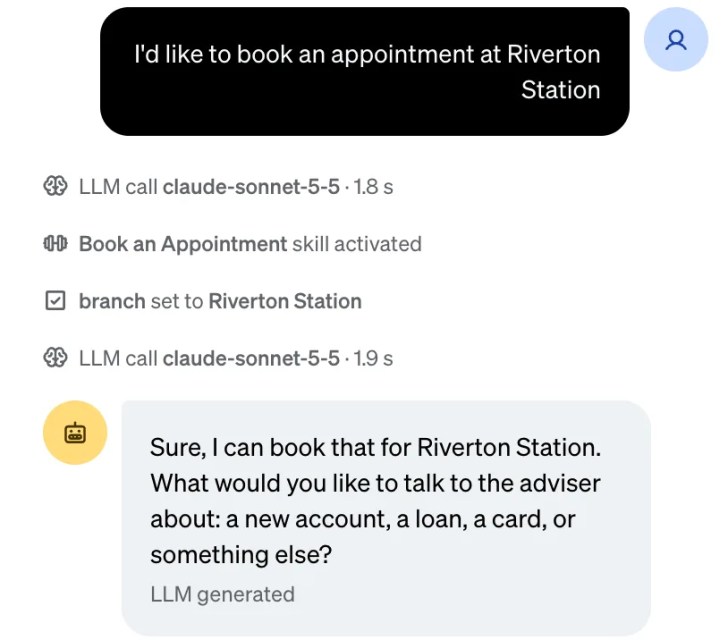
The agent never asked for the branch: you named it in your first message. A mortgage isn’t one of the four topics, so Claude picked the closest allowed value, loan.
Click the Inspector mode button at the top of the chat and choose Inspect. Under your first message, branch set to Riverton Station shows Claude writing the branch to memory as it started the skill:
Under your second message, click the first LLM call. Its Response is a call to set_memory: that’s Claude recording the topic:

Close that panel with its X. The Memory panel on the right shows everything the skill now remembers:

- A brain icon means Claude wrote the value.
- A wrench icon means a tool wrote it: here, your tool’s booking reference.
topicanddayhold values fromenum_values, so your code can rely on them.
When you’re done, go back to Terminal and press Ctrl+C to stop the agent.
Clean Up
If the agent is still running, press Ctrl+C in Terminal to stop it. Claude charges only when your agent calls it, so a stopped agent costs nothing. Keep the my-rasa-agent folder: the next part builds on it.
Common Mistakes
| Mistake | Do this instead |
|---|---|
Writing memory: as the top-level key | Use schema:, with public: or private: under it. |
Marking a value your tool works out as llm_settable | Leave it unmarked, like booking_reference, so Claude can’t make it up. |
Adding a description to a field Claude can’t set | Rasa accepts a description only on a field Claude can set. Remove it, or add llm_settable: true. |
| Writing a field from a tool without declaring it | Declare it in memory.yml first, with its type. |
| Expecting the values to stay for a second booking | A skill’s memory goes back to empty each time that skill starts again. |
Troubleshooting
| Problem | Fix |
|---|---|
rasa train fails with undeclared_memory_write | A tool writes a field that memory.yml doesn’t declare. Add the field, with its type. |
rasa train fails with mantle.validation.memory.description_not_exposed | A field has a description but isn’t llm_settable. Remove the description, or mark the field settable. |
| The Memory panel stays empty | Check that the fields have llm_settable: true and that the instructions tell Claude to record answers with set_memory. Then run rasa train again. |
| The agent keeps asking for a value you gave | Check that the value is one of the field’s enum_values, written exactly as in memory.yml. |
FAQ
What’s the difference between public and private memory?
Any skill can read a public field; only the skill that declares a private field can read it. Another skill reads a public field by its full name, such as session.book_appointment.branch.
Can Claude change a value after it’s set?
Yes, for a field marked llm_settable. If the customer changes their mind, Claude records the new answer with set_memory. Claude can’t change a field without that flag.
How do I keep a fact for the whole conversation?
Put it in a memory.yml at the project root instead. These project fields belong to no single skill, don’t reset when a skill starts again, and only tools can write them, never Claude. Rasa uses them for facts such as whether the customer has signed in.
Is memory kept after the agent stops?
Memory is part of the conversation, so it’s kept as long as the conversation is. By default that’s only until you stop the agent; a tracker store saves conversations to a database (Part 2’s FAQ).
Conclusion
You gave a skill memory: a memory.yml that declares each value, fields Claude fills in with set_memory as the customer answers, and a tool that reads them and writes a value of its own. The Inspector’s Memory panel showed every value and who wrote it.
← Previous: Part 4: Tools: Let Your Agent Run Python
Next → Part 6: References: Answer from Your Documents
Additional Resources
- Memory (opens in a new tab) (Rasa docs)
- memory.yml reference (opens in a new tab) (Rasa docs)
- Tools reference (opens in a new tab) (Rasa docs)
- skill.md reference (opens in a new tab) (Rasa docs)
Related
- Rasa Tutorial — Part 4: Tools: Let Your Agent Run Python
- Rasa Tutorial for Beginners: Mastering Rasa Pro in Python, with every part of the series
Rasa, Claude and other names mentioned are trademarks of their respective owners. JD Bots isn’t affiliated with or endorsed by Rasa Technologies or Anthropic.


0 comments