 Skip to main content


Saving the answer to a checkbox question from an n8n form with the Data table node stopped with unexpected array input … in row 0. The answer was a list, and a data table column takes one value. Joining the list into text fixed it.
What I Was Doing
I was building the three-page sign-up form from n8n Tutorial — Part 5: Forms: Collect Data with n8n Forms, in n8n 2.49.5 running in Docker. The form’s last page asks What would you like to hear about? with three checkboxes. A Data table node with the Insert row action saves every answer in a table, where topics is a string (text) column.
I dragged the checkbox answer onto topics, and n8n wrote this expression for it:
{{ $json['What would you like to hear about?'] }}
Then I sent a test submission with two boxes ticked, opened the node and clicked Execute step.
What I Expected
The node to save one row, with both ticked topics in the topics column.
What I Got
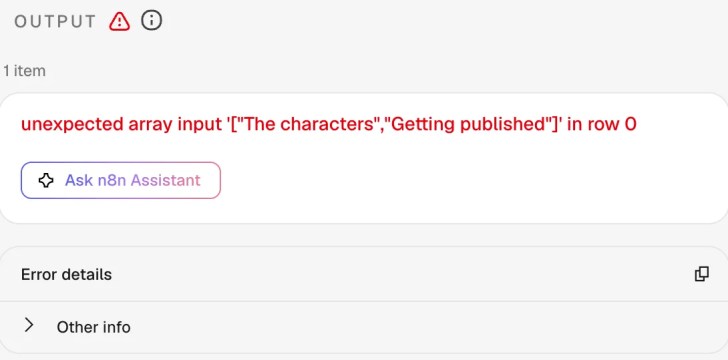
The node stopped, and n8n showed this error:
Problem in node ‘Insert row‘
unexpected array input '["The characters","Getting published"]' in row 0
What I Checked
Under each field, n8n previews the value its expression gives. Under topics, the preview wasn’t text but a list (an array), with one entry for each ticked box:
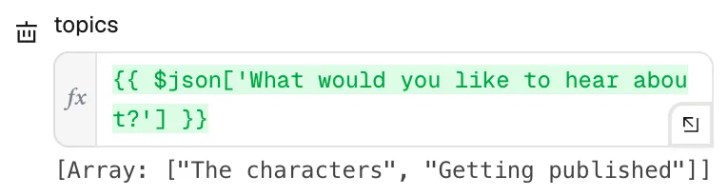
That matches n8n’s Form Trigger docs (opens in a new tab): a visitor can tick as many checkboxes as they like, so the answer holds every option they ticked.
Why It Happens
A data table column holds one value in each row, and its type is string, number, boolean or datetime. There’s no type for a list. Before it saves a row, the Data table node checks every value and stops at the first list it finds. In n8n’s source code, that check is the function dataObjectToApiInput in DataTable/common/utils.ts (opens in a new tab), which raises this error for any array.
row 0 is the item’s number. n8n counts the items a node receives from 0, so row 0 is the first item.
The Fix
Turn the list into text before the node saves it, with join. n8n’s expression reference (opens in a new tab) describes it as merging every element of an array into one string, with an optional separator between them.
In the Insert row node, click the topics field and add .join(', ') at the end of the expression, before the closing }}:
{{ $json['What would you like to hear about?'].join(', ') }}
The ', ' is what goes between the answers: a comma and a space. For a bigger editor, click the field’s expand icon at its bottom right:

If more than one column gets checkbox answers, add .join(', ') to each of them.
After the Fix
The expression now gives one line of text, The characters, Getting published. I clicked Execute step again, and the node saved the row:

Common Mistakes
| Mistake | What happens | Do this instead |
|---|---|---|
.join() with nothing between the brackets | The answers run together with only a comma: The characters,Getting published | Write .join(', '), with a comma and a space |
| Joining one checkbox answer but not another | The node stops with the same error, showing the other list | Add .join(', ') to every column that gets checkbox answers |
FAQ
What if a visitor ticks no box?
The row still saves, and the form ends on its thank-you page as usual.
Why does the error say row 0?
n8n counts the items a node receives from 0, so row 0 is the first item. A form submission arrives as one item.
Can a data table store the answers as a list?
No. Its column types are string, number, boolean and datetime, so a list goes in as text, as in the fix.
Conclusion
unexpected array input … in row 0 means the Data table node got a list where a column needs one value. The answer to an n8n form’s checkbox question is such a list. Add .join(', ') to its expression, before the closing }}, and the answers are saved as one line of text.
Additional Resources
- n8n Form Trigger node (opens in a new tab), n8n’s docs: form elements, including checkboxes
- Data table node (opens in a new tab), n8n’s docs: Insert row and the node’s other actions
- Array functions (opens in a new tab), n8n’s expression reference:
join()and the other array methods - DataTable/common/utils.ts (opens in a new tab) at n8n 2.49.5, n8n’s GitHub repository: where this error comes from
Related
- n8n Tutorial — Part 5: Forms: Collect Data with n8n Forms
- How to Create a Data Table in n8n
- n8n Tutorial — Part 2: Build Your First n8n Workflow
n8n and other names mentioned are trademarks of their respective owners. JD Bots isn’t affiliated with or endorsed by n8n GmbH.


0 comments