 Skip to main content


Anyone who knows an n8n webhook’s address can call it and start your workflow. Header Auth fixes that: n8n checks every call for a header that carries your secret key, and turns away calls without it before the workflow starts.
This post shows it with a tiny example of its own, a Protected webhook workflow that answers a GET request at /protected. You make a random key, add it to the Webhook node as a Header Auth credential, and call the webhook from Terminal with and without the key. By the end, only calls that send your key start the workflow.
Cost: free. Everything here runs on your own n8n Community Edition.
Every command, screen and output on this page is real, run with n8n 2 in Docker on macOS.
Step 1: Make a Secret Key
Open Terminal (press ⌘ Space, type Terminal and press Return) and run:
openssl rand -hex 32
openssl rand makes random bytes, and -hex 32 prints 32 of them as one line of 64 characters. That line is your key: copy it. A long random key can’t be guessed the way a word can, so treat it like a password and keep it out of chats, code and screenshots.
Step 2: Turn On Header Auth in the Webhook Node
Create a new workflow named Protected webhook, click Add first step and choose On webhook call. In the Webhook node, keep HTTP Method at GET, set Path to protected, then open the Authentication list and choose Header Auth:

Under Credential for Header Auth, click Connect to Header Auth:

In the dialog that opens, set Name to X-API-Key, the header your callers will send, and paste your key into Value. n8n shows it as dots:

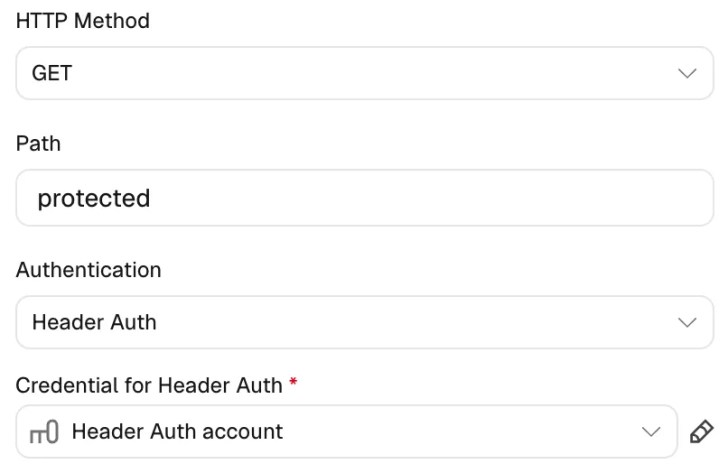
Click Save at the top right of the dialog. n8n closes it and selects the new credential, Header Auth account, in the Webhook node:
Step 3: Publish and Call the Webhook
Close the node and publish the workflow. Its Production URL, http://localhost:5678/webhook/protected, now answers calls (Test URL vs Production URL explains the two addresses). Call it without the key first:
curl http://localhost:5678/webhook/protected
Authorization data is wrong!
n8n turned the call away with a 403 Forbidden error, and the workflow didn’t start. Now send the key. -H adds a header to the request; replace YOUR_KEY with your key:
curl -H "X-API-Key: YOUR_KEY" http://localhost:5678/webhook/protected
{"message":"Workflow was started"}
Open the Executions tab: only the call with the key is there.

Here n8n runs on your own computer. Once it’s online, give callers an https:// address, so the key never travels as plain text.
Clean Up
Unpublish the Protected webhook workflow, then archive and delete it from its ⋯ menu. Then click Personal in the left sidebar, open the Credentials tab, click ⋯ on the Header Auth account card and choose Delete, then Yes, delete. Deleting can’t be undone.
Common Mistakes
| Mistake | What happens | Do this instead |
|---|---|---|
| Sending the key in a header with another name | Authorization data is wrong!: n8n only reads the header named in the credential | Send it as X-API-Key, or whatever Name your credential has |
| Pasting only part of the key | Authorization data is wrong!: the value must match exactly | Copy the whole key again |
| Using a short or guessable key | Anyone who guesses it can start your workflow | Make a long random key with openssl rand -hex 32 |
Troubleshooting
| Problem | Cause | Fix |
|---|---|---|
Authorization data is wrong! | The call had no X-API-Key header, or its value wasn’t your key | Send the header with the exact key |
The requested webhook "protected" is not registered. with the hint to click Execute workflow | You called the Test URL while n8n wasn’t listening | Call the Production URL, or click Execute workflow first |
FAQ
Does Header Auth protect the Test URL too?
Yes. While n8n listens for a test call, a call without the key gets the same Authorization data is wrong! answer, and n8n keeps listening for a call that has it.
Does the header name’s case matter?
No. n8n matches the name in any case, so x-api-key works as well as X-API-Key. The key itself must match exactly.
What other ways can I protect an n8n webhook?
The same Authentication list has Basic Auth (a user name and password), JWT Auth (a signed token) and n8n User Auth (OAuth2), which needs the caller’s consent with an n8n account. The node’s IP(s) Allowlist option can also limit which addresses may call it (n8n’s Webhook node docs (opens in a new tab)).
Conclusion
Header Auth turns a webhook anyone can call into one only your callers can start: make a long random key, save it in a Header Auth credential, and send it in that header with every call. Calls without it get a 403 and never start the workflow.
Additional Resources
- Webhook node: supported authentication methods (opens in a new tab) (n8n docs)
- Webhook credentials (opens in a new tab) (n8n docs)
- openssl rand (opens in a new tab) (OpenSSL docs)
- The -H option (opens in a new tab) (curl docs)
Related
- n8n Tutorial — Part 4: Webhooks: Start a Workflow from Any App
- n8n Webhook Test URL vs Production URL: What’s the Difference?
- How to Publish a Workflow in n8n
n8n and other names mentioned are trademarks of their respective owners. JD Bots isn’t affiliated with or endorsed by n8n GmbH.


0 comments