

Behind almost every app sits a database: the place where an online shop keeps its books, a bank keeps its balances and a chat app keeps its messages. So what is PostgreSQL? It’s a free, open-source database system with nearly 40 years of development behind it, and this series teaches it from the very first step.
This is Part 1 of the PostgreSQL Tutorial, a complete course for people who have never used a database. Nothing gets installed in this part. Instead, you learn the ideas and the words that every later part uses: what a database is, how tables, rows and columns work, how keys connect tables, what SQL is, and how PostgreSQL and its tools fit together. By the end of this part, you’ll be able to read a simple SQL query and say what it does.
By the end of the whole series, you’ll be able to:
- install PostgreSQL on macOS, Windows 11 or Ubuntu, and connect to it with psql and pgAdmin
- design a database and build its tables, keys and rules
- write SQL, from simple lookups to joins, window functions and JSON queries
- make slow queries fast with indexes and query plans
- secure, back up, monitor and upgrade a PostgreSQL server
- connect to PostgreSQL from C#, Python and Node.js
- run PostgreSQL in the cloud on Azure
This is Part 1 of the PostgreSQL Tutorial. The parts in Module A, Start Here:
- Part 1: What Is PostgreSQL? Databases, Tables and SQL Explained (you are here)
- Part 2: Connect with psql and Run Your First Commands
- Part 3: pgAdmin 4 for Beginners
All parts of the PostgreSQL Tutorial
Module A: Start Here
- Part 1: What Is PostgreSQL? Databases, Tables and SQL Explained
- Part 2: Connect with psql and Run Your First Commands
- Part 3: pgAdmin 4 for Beginners
Module B: Build the Database
- Part 4: Create a Database
- Part 5: Data Types Explained
- Part 6: Create Tables
- Part 7: Primary Keys, Foreign Keys and Constraints
- Part 8: Insert, Update and Delete Data
- Part 9: Import and Export CSV Files
Module C: Query Data
- Part 10: SELECT, WHERE, ORDER BY and LIMIT
- Part 11: LIKE, IN, BETWEEN, NULL and CASE
- Part 12: GROUP BY and Aggregate Functions
- Part 13: JOINs Explained
- Part 14: Subqueries and CTEs
- Part 15: UNION, INTERSECT and EXCEPT
- Part 16: String, Number and Conversion Functions
- Part 17: Dates, Times and Time Zones
Module D: Design and Performance
- Part 18: Database Design and Normalization
- Part 19: Views and Materialized Views
- Part 20: Indexes Explained
- Part 21: EXPLAIN and Query Performance
- Part 22: Transactions, Isolation Levels and Locks
Module E: Advanced SQL and Programming
- Part 23: Window Functions
- Part 24: Recursive Queries and LATERAL Joins
- Part 25: JSON and JSONB
- Part 26: Arrays, Enums, Ranges and Generated Columns
- Part 27: Full-Text Search
- Part 28: Functions and Stored Procedures
- Part 29: Triggers
Module F: Administration and Security
- Part 30: Users, Roles and Privileges
- Part 31: Row-Level Security
- Part 32: Configuration and Restarting the Server
- Part 33: Allow Remote Connections Securely
- Part 34: Backup and Restore
- Part 35: Automate Backups
- Part 36: VACUUM, ANALYZE and Autovacuum
- Part 37: Monitoring and Slow Queries
- Part 38: Table Partitioning
- Part 39: Streaming Replication
- Part 40: Upgrade to a New Major Version
Module G: PostgreSQL for Developers
- Part 41: Connect from C# .NET with Npgsql
- Part 42: Entity Framework Core with PostgreSQL
- Part 43: Connect from Python with psycopg
- Part 44: Connect from Node.js with node-postgres
Module H: Extensions, AI and Cloud
- Part 45: Extensions
- Part 46: Vector Search with pgvector
- Part 47: Azure Database for PostgreSQL
- Part 48: Migrate to Azure and What to Learn Next
Note: Part 1 has nothing to install or run. The SQL on this page is here to read, not to type yet. From Part 2 on, you run every statement yourself, and every command and output shown is real.
The practice database. The whole series uses one made-up bookstore database. It doesn’t exist yet: Part 4 creates it, and each later part adds to it. This part borrows two of its tables as examples.
Prerequisites
None. You don’t need to know programming, and you don’t need to have used a database before. From Part 2 on, you’ll need a computer where you’re allowed to install software: a Mac, a Windows 11 PC or an Ubuntu machine.
What Is a Database?
Data is any fact you want to keep: a book’s title, its price, the name of the person who ordered it, the date of the order.
A database is an organised collection of that data, stored so that programs can find it, change it and keep it safe. Think of a library. The books aren’t piled in a heap; they sit on labelled shelves, and a catalogue tells you exactly where each one is. A database does the same for data.
You don’t edit a database’s files by hand. You ask a program to do the work for you, and that program is called a database management system, or DBMS. PostgreSQL is a DBMS. Other well-known ones are MySQL, Microsoft SQL Server, Oracle Database and SQLite.
In everyday talk, people say “the database” for both the data and the program. This series keeps them apart where it matters: PostgreSQL is the program, and a database is one collection of data that PostgreSQL looks after.
Why not just use a spreadsheet?
A spreadsheet looks a lot like a table, and for one person keeping a short list, it’s often enough. A database is built for the jobs a spreadsheet struggles with:
| What you need | Spreadsheet | Database (PostgreSQL) |
|---|---|---|
| Many people and apps using the data at once | Fine for a few people editing by hand, but not built for many apps reading and writing at the same time | Built for many users at once, and each one sees a consistent view of the data |
| Rules that stop bad data | A cell usually accepts whatever is typed into it, unless someone sets up checks | Rules such as “every book needs a title” or “every book must have a real author” are checked on every change |
| Lists that refer to each other | The same details often get copied into many rows | Tables link to each other through keys, so each fact is stored once |
| Changes that must happen together | Nothing ties several edits together, so stopping halfway leaves a half-done change | A transaction makes several changes count as one: all of them happen, or none do |
| Control over who sees and changes what | Access is usually to the whole file | Permissions for each table, and even for single columns and rows |
| Lots of data | Slows down and gets hard to manage as it grows | Production systems manage many terabytes of data |
What Is PostgreSQL?
PostgreSQL is a free, open-source relational database management system. Its official About page describes it as an object-relational database system that uses and extends the SQL language.
In plain words, PostgreSQL is a program that stores your data in tables, keeps it safe and correct, and answers questions about it in a language called SQL. The “object” in object-relational means you can extend it with your own data types and functions, which comes much later in the series.

Where PostgreSQL came from
| Year | What happened |
|---|---|
| 1986 | The POSTGRES project starts at the University of California, Berkeley, led by Professor Michael Stonebraker. |
| 1994 | Andrew Yu and Jolly Chen add SQL to it, and it’s released as Postgres95. |
| 1996 | The project is renamed PostgreSQL, and its version numbers continue from 6.0. |
| Today | A worldwide community releases a new major version about once a year. |
The psql tool you’ll use in Part 2 dates from those Postgres95 days too. The full story is in A Brief History of PostgreSQL in the official manual.
Who makes PostgreSQL, and is it really free?
No single company owns or controls PostgreSQL. It’s built by the PostgreSQL Global Development Group, a community of developers around the world, and anyone can take part.
It’s released under the PostgreSQL License, which lets anyone use, change and share it for any purpose, private, commercial or academic, without paying. Companies do sell services around PostgreSQL, such as hosting, support and extra tools, but PostgreSQL itself stays free.
How do you say “PostgreSQL”?
The official FAQ says it’s pronounced Post-Gres-Q-L. Many people just say Postgres, and that’s an official name for the project too. Both names appear in this series and mean the same thing.
Tables, Rows and Columns
PostgreSQL is a relational database, which means it stores data in tables. The word comes from relation, the mathematical term for a table.
A table looks a lot like a single sheet in a spreadsheet. Here’s the books table from the bookstore database you’ll build:

The labels in the picture are the five words you’ll use most:
- Table: a named collection of rows about one kind of thing. Here, books.
- Column: one kind of fact, such as the price. Every row has the same columns, and every column has a data type: whole numbers, decimal numbers, text, dates, true or false, and many more. Part 5 covers them.
- Row: one item, here one book, with a value for each column. You’ll also see rows called records.
- Value: one fact in one row, such as 22.50, the price of book 2.
- Primary key: a column whose value is unique in every row and never empty, so each row can be found exactly. Here, it’s
book_id.
Note: Rows have no fixed order. SQL doesn’t promise to give rows back in the order you added them. When the order matters, you ask for it, as the SQL example further down shows.
Primary Keys and Foreign Keys: How Tables Connect
The books table stores an author_id for each book, not the author’s name. The names live in a second table, authors, and the number connects the two:

author_id is the primary key of the authors table. In the books table, author_id is a foreign key: a column whose values must match a row in another table. The PostgreSQL manual says a foreign key maintains the referential integrity between two related tables. In plain words, PostgreSQL refuses a book whose author doesn’t exist.
Why not put the author’s name in the books table?
You could, and a spreadsheet often does. But look at what happens with Mira Kale, who wrote two of the books:
- With one table, her name is typed twice. Type it as “Mira Kail” once, and the database now holds two different authors.
- If the way her name is written ever changes, you have to find and fix every book she wrote.
- With two tables, her name is stored once. Both books point to it through
author_id1, so one change fixes everything.
Splitting data into tables that point to each other is the heart of a relational database. Part 7 builds these keys for real, and Part 18 explains how to decide which tables a database needs.
What Is SQL?
SQL, short for Structured Query Language, is the language you use to talk to a relational database. People say it as letters, S-Q-L, or as “sequel”, and both are common.
SQL is different from most programming languages: you describe what you want, and PostgreSQL works out how to get it. You don’t tell it which file to open or which row to read first. Its query planner picks the way it estimates to be fastest, and Part 21 shows you how to see the plan it chose.
Your first look at a SQL query
Here’s a question for the books table: which books cost less than 20, cheapest first? In SQL, it reads like this:
SELECT title, price
FROM books
WHERE price < 20
ORDER BY price;
Line by line:
| Line | What it tells PostgreSQL |
|---|---|
SELECT title, price | Show the title and price columns. |
FROM books | Take them from the books table. |
WHERE price < 20 | Keep only the rows where the price is less than 20. |
ORDER BY price; | Sort the answer by price, lowest first. The semicolon marks the end of the statement. |
With the four books in the table above, the answer has three rows. A Map of Quiet Places costs 22.50, so it’s left out:
| title | price |
|---|---|
| Salt and Starlight | 9.99 |
| The Paper Lantern Café | 14.99 |
| The Clockmaker’s Garden | 18.00 |
Notice that the answer is a table too. Every query answers with rows and columns. You’ll write queries like this one yourself in Part 10.
The main kinds of SQL statements
Most of what you’ll ever do with a database fits into a handful of statements:
| You want to | The statement starts with | Example | Taught in |
|---|---|---|---|
| Read rows | SELECT | SELECT title FROM books; | Part 10 |
| Add a row | INSERT | INSERT INTO authors (author_id, name) VALUES (4, 'Orla Finch'); | Part 8 |
| Change rows | UPDATE | UPDATE books SET price = 12.99 WHERE book_id = 4; | Part 8 |
| Remove rows | DELETE | DELETE FROM books WHERE book_id = 4; | Part 8 |
| Create a table | CREATE TABLE | CREATE TABLE genres (genre_id integer PRIMARY KEY, name text); | Part 6 |
| Let someone in | GRANT | GRANT SELECT ON books TO reporting; | Part 30 |
Warning: an UPDATE or DELETE without a WHERE line changes or removes every row in the table. Part 8 shows how to check which rows a change will touch before you run it.
The PostgreSQL manual is organised the same way, with chapters called Data Definition (building tables), Data Manipulation (adding, changing and removing rows) and Queries (reading them).
Four rules that make SQL easier to read
- A statement ends with a semicolon (
;). That’s how PostgreSQL knows you’ve finished. - Keywords aren’t case-sensitive.
SELECTandselectdo the same thing. The manual mentions a common convention, keywords in capitals and names in lower case, and this series follows it so the parts of a query are easy to tell apart. - Text goes in single quotes, like
'Mira Kale'. Double quotes mean something else in SQL, which Part 4 explains. - Two hyphens start a comment. Everything after
--on a line is ignored, so you can leave notes in your SQL.
SQL vs PostgreSQL
SQL is the language; PostgreSQL is one program that understands it. MySQL, SQL Server, Oracle Database and SQLite understand SQL too, so most of what you learn here carries over. Each one also adds its own extras on top of the SQL standard, and the PostgreSQL manual points out which features are PostgreSQL’s own.
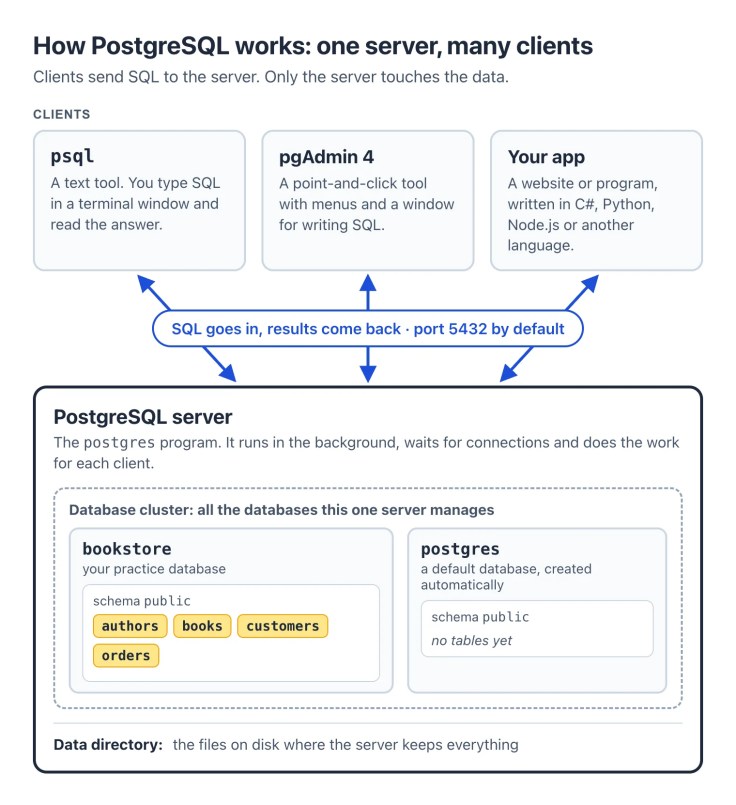
How PostgreSQL Works: One Server, Many Clients
PostgreSQL uses a client/server model, in which two kinds of programs work together:
The server
The server is a program called postgres. It manages the database files, accepts connections from clients and carries out each client’s requests. It runs in the background all the time, waiting for clients to connect, even when nobody is using it.
The server keeps everything in one folder on disk, called the data directory. You never edit those files yourself. Every change goes through the server, and that’s what keeps the data correct.
The clients
A client is any program that connects to the server and sends it SQL. In this series, you’ll use three kinds:
- psql, a text tool that comes with PostgreSQL. You type SQL, press Enter and read the answer. Part 2 starts with it.
- pgAdmin 4, a free graphical tool with menus, a tree of your databases and a window for writing SQL. Part 3 introduces it.
- Your own apps, written in C#, Python, Node.js or another language. They connect through a driver, such as Npgsql for .NET, psycopg for Python or node-postgres for Node.js. Parts 41 to 44 cover them.
The client and the server can run on the same computer, which is how you’ll start, or on different computers that talk over a network. Clients find the server by its address and a port number, which is 5432 unless someone changes it.
Databases, schemas and the database cluster
One server can hold many databases. Each database is a separate collection of data: the bookstore database you’ll build sits next to others, such as the postgres database that every new installation creates as a default.
The manual calls the set of all the databases one server manages a database cluster. Here, cluster doesn’t mean several computers working together. One computer is enough for this whole series.
Inside each database, tables are grouped into schemas, which work like folders. Every new database has a schema called public, and that’s where your tables go unless you say otherwise. Part 6 shows how to create your own.
The Tools You’ll Install in This Series
| Tool | What it is | Where you get it | First used in |
|---|---|---|---|
| PostgreSQL server | The database program itself. It stores the data and runs your SQL. | The installer for your operating system | The install guides |
| psql | A text tool for typing SQL and reading results | Comes with PostgreSQL | Part 2 |
| pgAdmin 4 | A graphical tool for browsing databases and writing SQL | Included in the macOS and Windows installer | Part 3 |
| StackBuilder | A helper that downloads extra PostgreSQL tools and drivers | Included in the macOS and Windows installer | When a later part needs it |
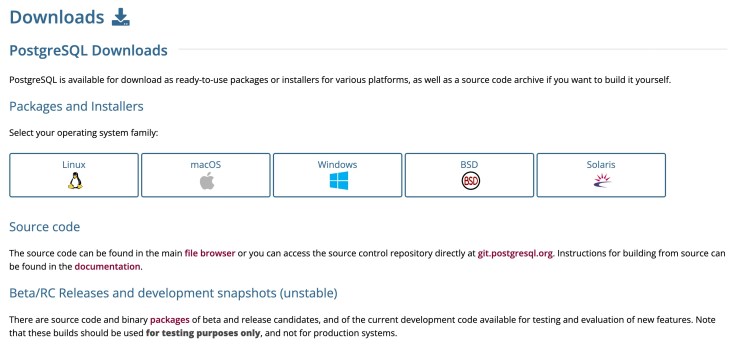
Every official download starts at the Downloads page on the PostgreSQL website:
What this series uses on each system:
- macOS and Windows: the interactive installer by EDB, which the download page links to. EDB is a company that builds this free installer, and one wizard installs the server, pgAdmin and StackBuilder together.
- Ubuntu: Ubuntu includes PostgreSQL, but each Ubuntu release keeps the major version it shipped with for its whole life. This series uses the PostgreSQL Apt repository instead. The PostgreSQL project maintains it, so you get the newest version and its updates.
Each operating system gets its own step-by-step install guide before Part 2:
- How to Install PostgreSQL on macOS
- How to Install PostgreSQL on Windows 11
- How to Install PostgreSQL on Ubuntu
Tip: Install only from postgresql.org’s download pages or the links on them. The same page warns that beta and release candidate (RC) builds are for testing only, so always pick the newest released version.
PostgreSQL Versions in Plain Words
PostgreSQL’s versioning policy is short and worth knowing before you install anything:
- A new major version, with new features, comes out about once a year.
- Each major version gets bug and security fixes for 5 years, in minor releases that come out at least once every three months.
- The first number is the major version, and the second is the minor release. Going from 10.0 to 10.1 is a minor update; going from 10 to 11 is a major upgrade. The policy page uses these same examples.
- A minor update only replaces the program files: stop the server, install the update, start the server again. A major upgrade also has to convert your data, with a tool called
pg_upgradeor with a dump and restore. Part 40 shows how.
The PostgreSQL team recommends always running the latest minor release of your major version. This series always uses the newest released major version, and its posts are updated when a new one comes out.
What Else PostgreSQL Can Do
Tables and SQL are only the start. The official feature list includes:
- JSON documents, stored and searched alongside regular columns (Part 25)
- Full-text search, which finds rows by the words in a text, not only by exact matches (Part 27)
- Functions and stored procedures, written in PL/pgSQL, Python, Perl or Tcl (Part 28)
- Row-level security, so each user sees only the rows they’re allowed to see (Part 31)
- Table partitioning, which splits a very large table into smaller pieces (Part 38)
- Replication, which keeps live copies of your data on other servers (Part 39)
- Extensions that add whole new abilities, such as PostGIS for maps and locations, and pgvector for the similarity search used in AI apps (Parts 45 and 46)
It also scales. The official site mentions production systems that manage many terabytes of data, and specialised systems that manage petabytes.
The Bookstore Database You’ll Build
Instead of a new example in every part, the series grows one database, step by step, so you see how a real one comes together:
- Part 4 creates the bookstore database.
- Part 6 adds the first tables: authors, books and customers.
- Part 7 adds keys and rules, plus categories, orders and the items in each order.
- Parts 8 and 9 fill it with data, typed in and imported from CSV files.
- Later parts add reviews, book details stored as JSON, full-text search, an audit log and more.
Every name, title and email address in it is made up. If you join the series in the middle, each part starts with a short catch-up script that rebuilds the database to that point.
Key Terms at a Glance
| Term | What it means |
|---|---|
| Data | Facts you want to keep, such as a title or a price |
| Database | An organised collection of data, stored so programs can find and change it |
| DBMS | Database management system: the program that stores the data and answers requests. PostgreSQL is one. |
| Relational database | A database that stores data in tables that connect to each other through keys |
| Table | A named set of rows about one kind of thing, such as books |
| Column (field) | One kind of fact with one data type, such as the price |
| Row (record) | One item in a table, such as one book |
| Value | One fact in one row |
| Data type | The kind of value a column holds: text, numbers, dates and so on |
| Primary key | A column whose value is unique in every row and never empty |
| Foreign key | A column whose values must match a row in another table |
| SQL | Structured Query Language, the language for talking to relational databases |
| Query | A SQL statement that asks for data, such as a SELECT |
| Server | The postgres program that manages the data and runs SQL |
| Client | Any program that connects to the server: psql, pgAdmin or your own app |
| Database cluster | All the databases that one PostgreSQL server manages |
| Schema | A folder-like group of tables inside a database. public is the default. |
| Transaction | A group of changes that succeed or fail together |
| Port | The number clients use to reach the server: 5432 by default |
Clean Up
There’s nothing to clean up after this part, because you haven’t installed or created anything yet. From Part 4 on, each part explains how to remove what it created, in case you want to start over.
Common Mistakes
| Mistake | What happens | Do this instead |
|---|---|---|
| Writing “Postgre” or “PostgresSQL” | Neither is the product’s name. | Write PostgreSQL, or Postgres, its official short name. |
| Treating SQL and PostgreSQL as the same thing | You expect every SQL example from the web to work unchanged, but each database adds its own extras. | Learn SQL as the language, and check the PostgreSQL manual when an example comes from another database. |
| Keeping everything in one big table, like a spreadsheet | The same author’s name is typed again for every book, and one typo looks like a new author. | Split the data into tables and connect them with keys (Parts 7 and 18). |
| Expecting rows back in the order you added them | SQL doesn’t guarantee any row order, so the order can change. | Add ORDER BY whenever the order matters. |
| Installing a beta or release candidate | These builds are for testing only, as the download page says. | Install the newest released version from postgresql.org/download. |
| Thinking you must learn programming first | You put off something you could start today. | Start with SQL. Its statements are short and read like plain English. |
Troubleshooting
| Symptom | Likely cause | Fix |
|---|---|---|
| The download page lists several versions, and you don’t know which one to pick. | Several major versions are supported at the same time, each for 5 years. | Pick the newest major version. That’s the one this series uses. |
| A website asks you to pay for PostgreSQL. | It’s selling something else, such as hosting, support or its own product. | PostgreSQL itself is free. Download it from postgresql.org/download. |
| Your work computer won’t let you install software. | You don’t have administrator rights on it. | Ask your IT team to install PostgreSQL for you, or to give you the rights for the install. |
| The word “cluster” makes you think you need several servers. | In PostgreSQL, a database cluster is the set of databases that one server manages. | One computer is enough for this whole series. |
| All the new terms blur together. | It’s a lot of new words at once. | Keep the Key Terms table above handy. Every term comes back, with practice, in later parts. |
FAQ
Is PostgreSQL free?
Yes. The PostgreSQL License lets anyone use, change and share PostgreSQL for any purpose, including commercial use, without paying. Its one condition is that the copyright notice and the license text stay in every copy of PostgreSQL you pass on.
Is Postgres the same as PostgreSQL?
Yes. POSTGRES was the original Berkeley project’s name, and the PostgreSQL team still treats Postgres as an official name, partly because it’s easier to say.
Do I need to know programming to learn PostgreSQL?
No. SQL is a small language of short statements, and this series explains every one. Programming only comes in with Module G, where you connect apps to PostgreSQL.
Which operating system do I need?
Any of macOS, Windows 11 or Ubuntu. The install and setup steps differ, so each one has its own guide. SQL, psql and pgAdmin work the same way on all three.
Is PostgreSQL a NoSQL database?
No. It’s a relational database that uses SQL. It can also store and query JSON documents, the kind of data NoSQL databases are known for, and Part 25 covers that.
Who owns PostgreSQL?
No company owns it. The community-run PostgreSQL Global Development Group develops it. The names Postgres and PostgreSQL, and the elephant logo, are registered trademarks of the PostgreSQL Community Association of Canada.
Can PostgreSQL handle large applications?
Yes. The official site mentions production systems that manage many terabytes of data. Parts 20 to 22 and 36 to 39 cover the techniques that keep a growing database fast and safe.
What should I be able to do after this part?
Explain what a database, a table, a row, a column and a key are; read a simple SQL query and say what it does; and describe how psql, pgAdmin and your own apps talk to the PostgreSQL server.
Conclusion
You now have the map for the whole series. A database keeps data organised and safe, and PostgreSQL is the free, open-source program that runs it. Tables hold the data in rows and columns, keys connect the tables, and SQL is how you ask for what you need. Clients such as psql and pgAdmin send that SQL to the PostgreSQL server, which does the work.
Next, install PostgreSQL on your computer with the guide for your operating system. Then Part 2 has you connect with psql and run your first commands.
Coming next: Part 2: Connect with psql and Run Your First Commands.
Additional Resources
- About PostgreSQL, with the official feature list
- What Is PostgreSQL? in the PostgreSQL manual
- A Brief History of PostgreSQL
- Architectural Fundamentals: the client/server model
- Concepts: tables, rows, columns and the database cluster
- Constraints: primary keys and foreign keys
- Lexical Structure: the rules of SQL syntax
- Versioning Policy
- PostgreSQL License
- PostgreSQL FAQ
- PostgreSQL Downloads
- pgAdmin
Postgres, PostgreSQL and the Slonik Logo are trademarks or registered trademarks of the PostgreSQL Community Association of Canada, and used with their permission.


